
SEO & GEO Sander·Team Lead SEO, GEO & Website
How to get AI search engines to cite your LinkedIn content
Sander·Team Lead SEO, GEO & Website Google Premier Partner
 Meta Business Partner
A study of 407 .nl sites: almost 1 in 4 blocks AI crawlers such as ChatGPT and Perplexity, often unknowingly. How to check and fix it tomorrow.

Almost a quarter of the largest Dutch websites keep AI search systems such as ChatGPT and Perplexity out, and in most cases that is not a deliberate choice. The finding comes from an ongoing measurement by research firm Writgo Media across the five hundred highest ranked .nl domains. Of the 407 sites the firm could reach, 22.9 percent fully block at least one AI crawler via robots.txt. Fifteen percent shut out three or more bots at once. The sample is Dutch, but the causes described below apply to any site, wherever it is hosted. For a marketing manager or business owner just starting to take GEO seriously, this means one thing above all: check first whether your site even gets in, before thinking about how to stand out in an AI answer. What you can do tomorrow is laid out further down in this article as a concrete step-by-step plan.
Writgo Media scanned the Tranco ranking of .nl domains and tested each site's robots.txt file against fourteen known AI user agents. At the first measurement in June 2026, published via Frankwatching, 21.1 percent of the sites examined blocked at least one crawler. By early September the figure stands at 22.9 percent. The number of sites shutting out AI is growing rather than shrinking.
Looking at individual bots, OpenAI's GPTBot is blocked most often (17.4 percent), followed by Common Crawl's CCBot (16.7 percent), ByteDance's Bytespider (14.7 percent) and Anthropic's ClaudeBot (14.5 percent). Google-Extended, the crawler that fetches content for Gemini and AI Overviews, is excluded by 13.5 percent of sites. Strikingly, sites are busy blocking while almost nobody does anything to actually get cited. Only 1.5 percent of homepages carry FAQ schema, the markup format AI systems can quote most easily. An llms.txt file, a kind of signpost for AI systems, is present on 8.6 percent. Structured data in some form does appear on just over half of the sites, 52.1 percent.
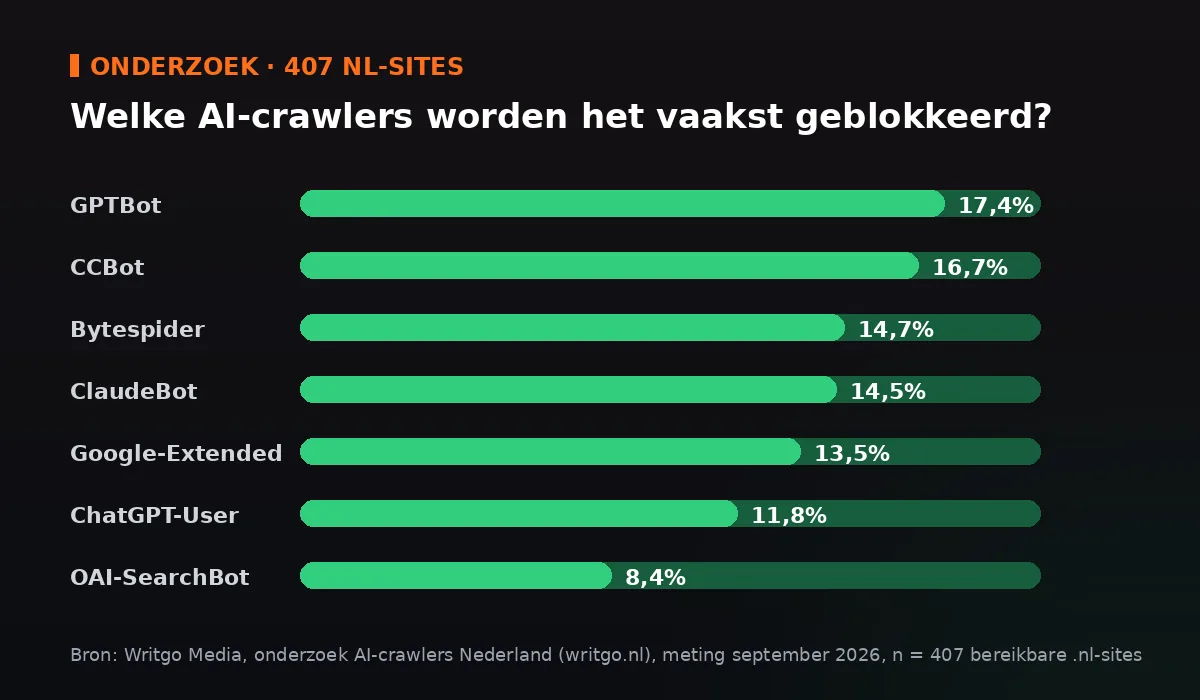
Almost a quarter of the largest Dutch sites lock the door to AI, while almost nobody behind that door has anything laid out ready to be cited.
On the websites we audit, we rarely see an explicit decision to keep GPTBot or ClaudeBot out. More often the cause is a robots.txt file drawn up years ago by an agency or developer, untouched by anyone since. Security plugins for WordPress sometimes add default blocks for anything that looks like a bot, AI crawlers included. And because robots.txt is not a visible part of the site, it simply goes unnoticed. Someone copies a template from another site, or lifts a line from a tutorial written three years ago, and the block travels along to every new site built on that template. That is also how Writgo Media explains why clusters of similar blocking rules keep reappearing at completely unrelated organisations: they are copies of copies.
A common mistake is to lump all AI crawlers together. That is a shame, because there is a real difference in what each bot comes to do. GPTBot and ClaudeBot fetch content to train language models, a one-off, structural visitor you can reasonably refuse if you would rather your content did not end up in a training set. OAI-SearchBot and Claude-SearchBot work differently: they fetch current pages the moment someone asks ChatGPT or Claude a question that calls for an up-to-date answer, much like Googlebot does for the regular search results. And then there is a third category, agents such as ChatGPT-User and Claude-User, which look along live when a user asks the AI to open or summarise a specific page.
Block the first group and you lose essentially nothing in direct findability; at most, your content will not help train tomorrow's models. Block the second or third group and you actively disappear from the answers shown to users today. The research shows that sites rarely make this distinction. OAI-SearchBot is blocked by 8.4 percent and ChatGPT-User by 11.8 percent, almost as often as the training bot GPTBot itself. For most sites that was probably never the intention.
This does not have to be a project of weeks. Half an hour and access to your robots.txt file will get you a long way.
A few things go wrong structurally. Adding an llms.txt without ever checking whether robots.txt still blocks those bots is the most common. The file then points to content the crawler is not even allowed to fetch. We also regularly see a caching plugin or CDN setting serving a separate, older version of robots.txt than the one in the WordPress settings, so a change in the CMS alters nothing about what a crawler actually gets to see. And an IP block from a firewall or security tool at the hosting provider sits entirely outside robots.txt, so even a perfect robots.txt file does not guarantee a bot actually gets in. Always test with a separate tool that checks the actual server response, not just the robots.txt file itself.
No. Google-Extended is separate from the regular Googlebot that indexes your site for the classic search results. If you block Google-Extended, Google will not use your content for Gemini and AI Overviews, but your position in the ordinary search results is unaffected.
No, and that is precisely the point of this research. Only the search and user-oriented bots, such as OAI-SearchBot and ChatGPT-User, determine whether your site can appear in a current answer. Blocking training bots such as GPTBot has no effect on that in the short term.
No. robots.txt determines which bots get access to your site. An llms.txt file is not an access control but a reading guide, a short, structured overview of your most important content that makes it easier for an AI system to summarise or cite your pages correctly.
Leads the SEO, GEO and web team and works on visibility in Google and in AI answers, from technical foundations to content. Questions about this article? Book a strategy call or meet the whole team.
Sander·Team Lead SEO, GEO & Website
 Sander·Team Lead SEO, GEO & Website